While on Windows or Mac, have you ever wanted to read an article from the WSJ, NYT, or any other prominent Media organization, but received a message that the page is paywalled? This article is for you. A Browser extension from our Your Windows Guide group is live, which helps you access Paywalled News pages. Additionally, by stripping unnecessary query parameters from the address, the add-on ensures the cleanest possible URL is saved for accuracy.
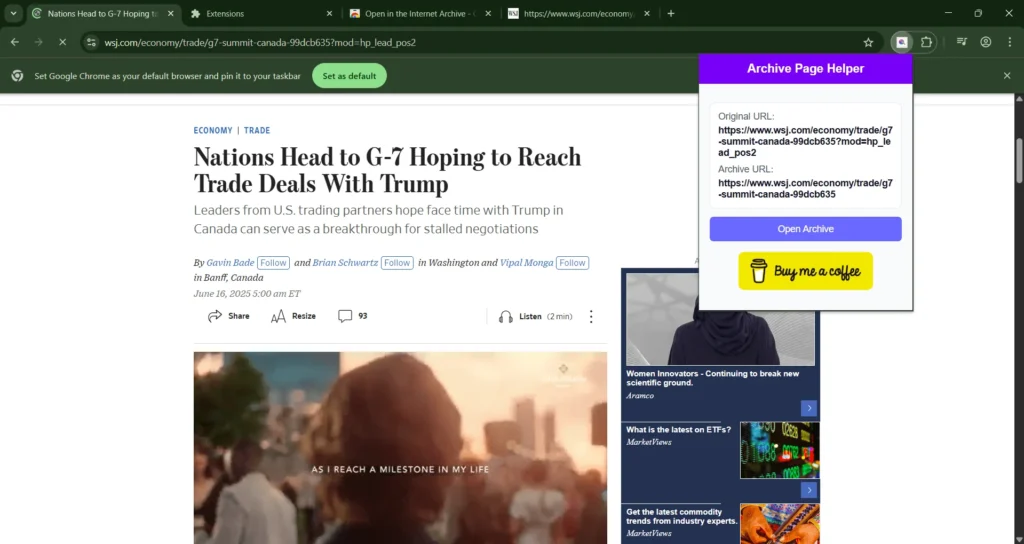
Why choose Open in the Internet Archive extension?
Some of the main reasons why this Extension helps you access Paywalled pages are below:
- One-click accessing of any live webpage from the Internet Archive.
- Automatic URL cleaning for privacy and shareability.
- Visual confirmation of original vs. cleaned link in the popup.
- Zero configuration after installation.
- Small footprint with minimal permissions.
- Paywalled pages for free.
Ready to access paywalled pages? Download it from the Web Store:
Visit the Chrome Web Store listing from the link below for the Extension:
Open the page, tap “Add to Chrome,” then pin the icon for quick access.
Stop worrying about link rot and start preserving the web in seconds. Install “Open Internet Archive” today and make every click count for the future internet.
To conclude, support the developer via the optional “Buy Me a Coffee” link if you find the tool valuable. Also, the YWG group has a Browser Sticky Notes extension live, with 100+ happy users.