RecoveryFox AI Data Recovery software is one of the best data recovery solutions for Windows, which leverages the power of AI to recover your data in case of accidental or intentional data loss. This article gives a comprehensive RecoveryFox AI review.
Table of Contents
About RecoveryFox AI
Developed by WonderFox, it supports recovery from a wide range of storage devices, including HDDs, SSDs, USB drives, and memory cards. The software uses advanced AI to scan accurately, ensuring the retrieval of lost files such as documents, photos, videos, and emails, even from formatted or corrupted partitions. With an intuitive interface and fast scanning modes, RecoveryFox AI minimises recovery time while maximising the success rate, making it a reliable choice for both personal and professional data restoration needs.
Download and Purchase
The RecoveryFox AI Software can be downloaded from the RecoveryFox AI page located below:
. The plans for the software vary depending on your usage.
- 1-Week Plan: $49.95, suitable for urgent or emergency recoveries.
- 1-Month Plan: $59.95, for casual users, freelancers, or short-term recovery needs.
- 1-Year Plan: $69.95 to $89.95, aimed at professionals or businesses requiring long-term protection.
- Lifetime Plan: $99.95 to $149.95, one-time payment for permanent access, ideal for power users and enterprises.
All plans of the Software typically offer unlimited recovery, free updates, and support, without automatic renewals. Additionally, the free version of RecoveryFox AI allows you to scan and preview your data at no cost, so you can see what’s recoverable before deciding to make a purchase.
Interface and usage
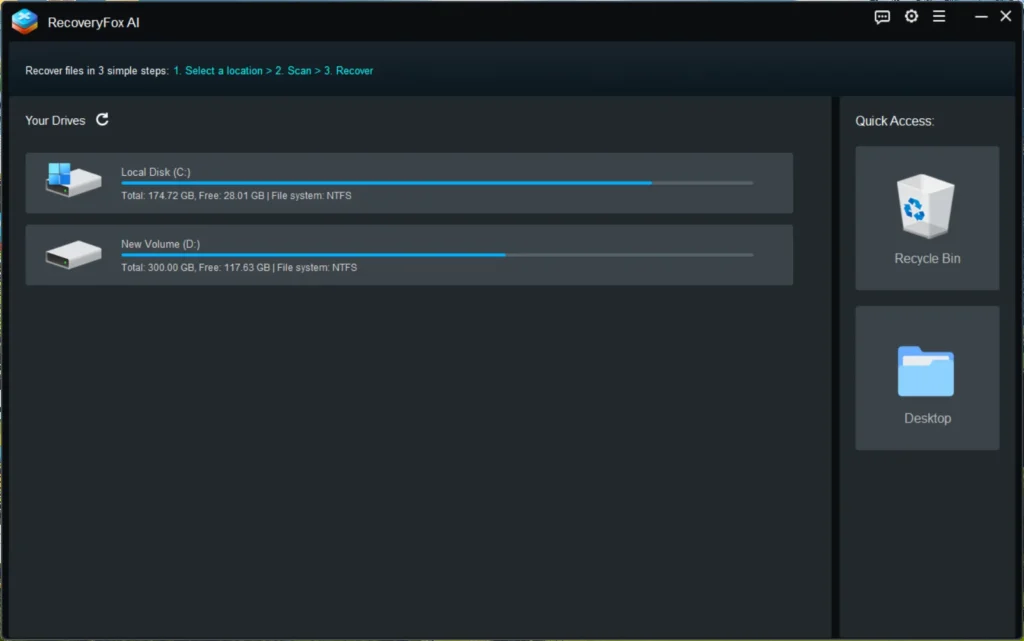
Starting with the basics. WonderFox works with Windows 10 and Windows 11. The Homescreen is very simplistic, allowing you to choose between the target drive. As soon as you hover over the drive where the deleted data is, you will see “Click here to start scan”.
Concurrently, the scan of the drive would be initiated, showing the files deleted in the Quick scan. With the Quick Scan, the deep scan would continue side-by-side.
Scan results powered by AI, called AI Scan
One of the Impressive features I like about RecoveryFox is the results powered by AI. These are displayed separately, as seen in the Image:
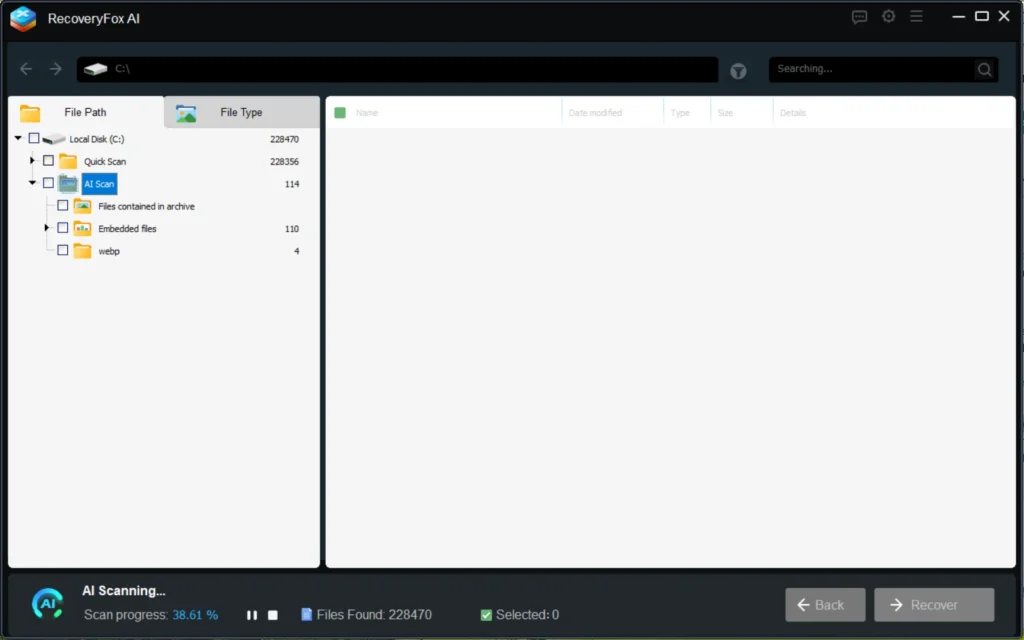
The AI scanning results populate as soon as you wait. However, it can take some time to sort files and get more details.
RecoveryFox AI Review – How to Recover Files Effectively Using RecoveryFox
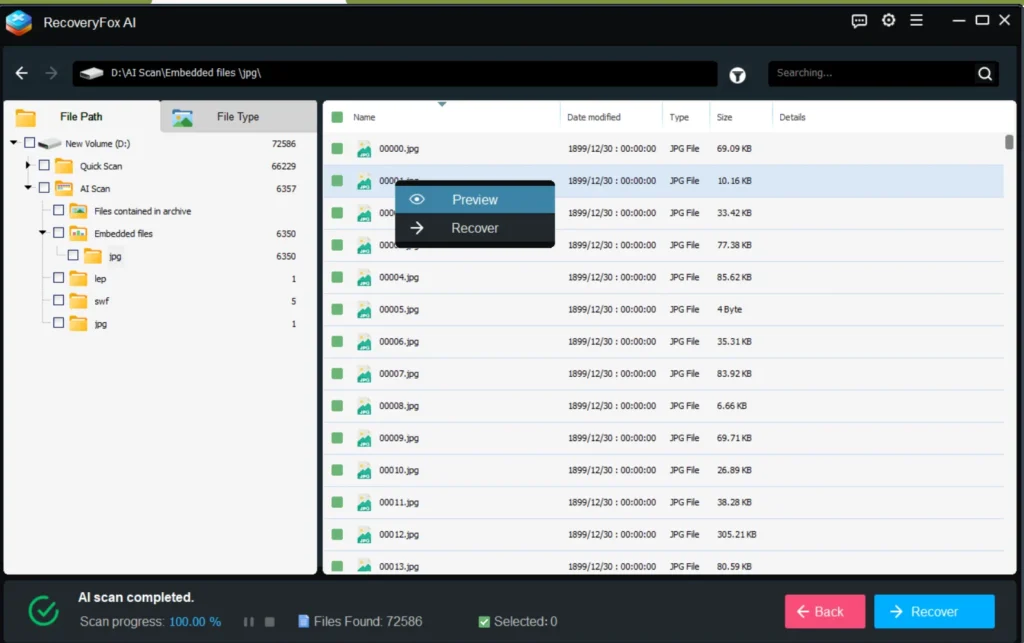
- The Recovery Process is straightforward using the Software. To recover any specific file, Right-click the File and choose Recover.
- Additionally, some files might be there whose path might be lost due to overwritten clusters. These files would be found under Quick Scan > File Path Lost.
- You can also recover the files using the “File Type” tab if you are specific about the file type. The File Types are divided into different categories like Database, Video, Images etc.
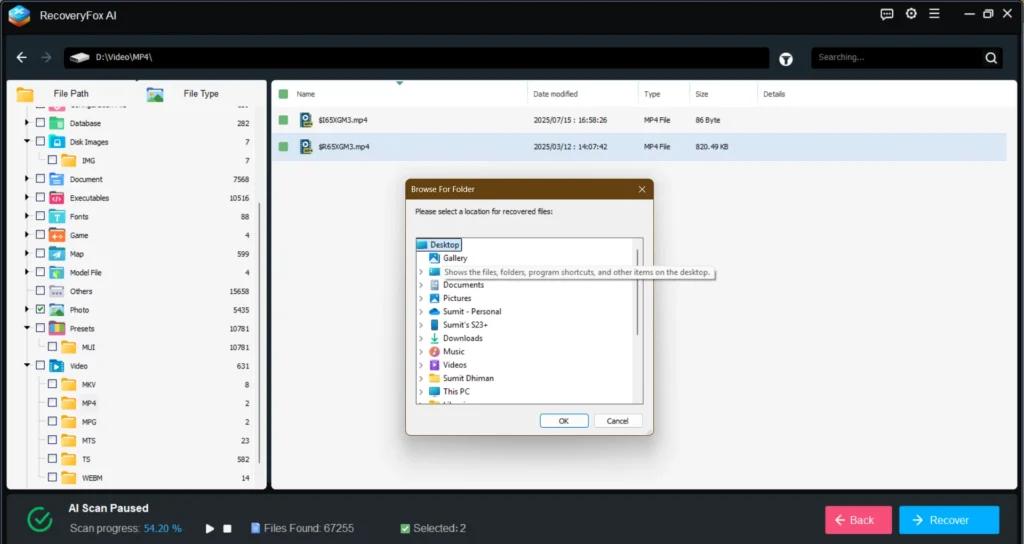
- Once you have found the file, you should be able to select the Restore option. Select the Path where you want the Restore to be, and click OK.
- The file should now be at the desired path.
Easier scanning and restoring the files facility makes me say that the RecoveryFox AI review is pretty good.
Room for Improvements
Some Improvements in RecoveryFox AI can be accomplished. First of all, better detection algorithms are needed to find the lost paths. Moreover, I should be able to search for the file names while the scan is being done, which would help the user save time.
Additional Notes
If you have any questions or need support related to WonderFox AI software, feel free to click the Hamburger icon and click the Get Support icon. Concurrently, feedback about the Product can also be provided from the same menu.
To summarise, my RecoveryFox AI review is very positive. If you are looking for a data recovery software choice, it might be an ideal pick.