This article is an informative, descriptive overview of the most basic Microsoft 365 subscription, Microsoft 365 Basic and its Business counterpart i.e. office 365 Business subscription
Table of Contents
What is Microsoft 365?
Microsoft 365 is basically your all-in-one digital toolkit that brings together familiar apps like Word, Excel, and PowerPoint. Available for both end consumers and businesses. If you’re running a small team or a growing company, Microsoft 365 Business Basic is a fantastic, cost-effective way to get started. Similarly, the Basic provides real value if you are comfortable running Word and other apps in the browser.
Various Plans of Microsoft 365
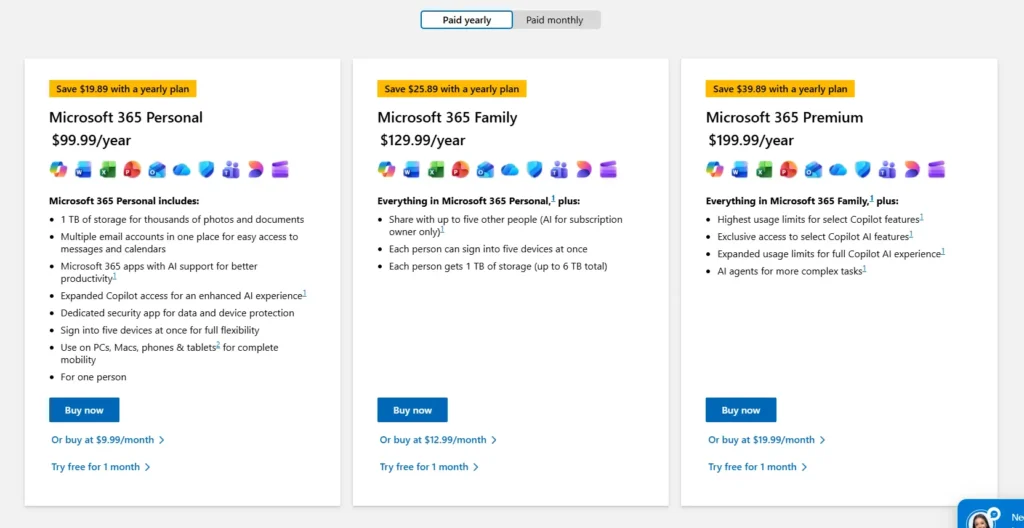
Alongside Microsoft 365 Basic, Microsoft offers Personal, Premium, and Family subscriptions. Here are a few details:
Microsoft 365 Basic: This is the most affordable option, providing 100 GB of cloud storage and ad-free Outlook email, though it only includes the web and mobile versions of Office apps. It’s a great choice if you primarily work online and just need extra space for your photos and files.
Microsoft 365 Personal: Designed for one person, this plan jumps to 1 TB of storage and grants full access to desktop versions of Word, Excel, and PowerPoint with offline capabilities. It also includes advanced security features and AI-powered tools, such as Copilot, to help you write and create more efficiently.
Microsoft 365 Family: This plan offers the best value for households, letting you share all the “Personal” benefits with up to 6 people. Each person gets their own private 1 TB of storage (6 TB total) and can install the premium apps on their own devices simultaneously.
Why Microsoft 365 Basic provides real value
Be it Microsoft 365 Business Basic or Microsoft 365 Basic for consumers, both offer pretty good value. Here are a few features of the basic version of Microsoft 365. First, I would cover the end-consumer version of the Plan.
Microsoft 365 Basic
Microsoft 365 Basic is a OneDrive-focused plan available for web, iOS, and Android. It provides 100GB of Cloud Storage, with Ransomware protection for Photos and files.
In addition to OneDrive, you get ad-free Outlook for Web, iOS and Android and Technical support for any Microsoft product.
You can use Web versions of Microsoft 365 apps like Word, Excel, PowerPoint, etc., which are technically free.
You can read more about the plan here.
Office 365 Business subscription
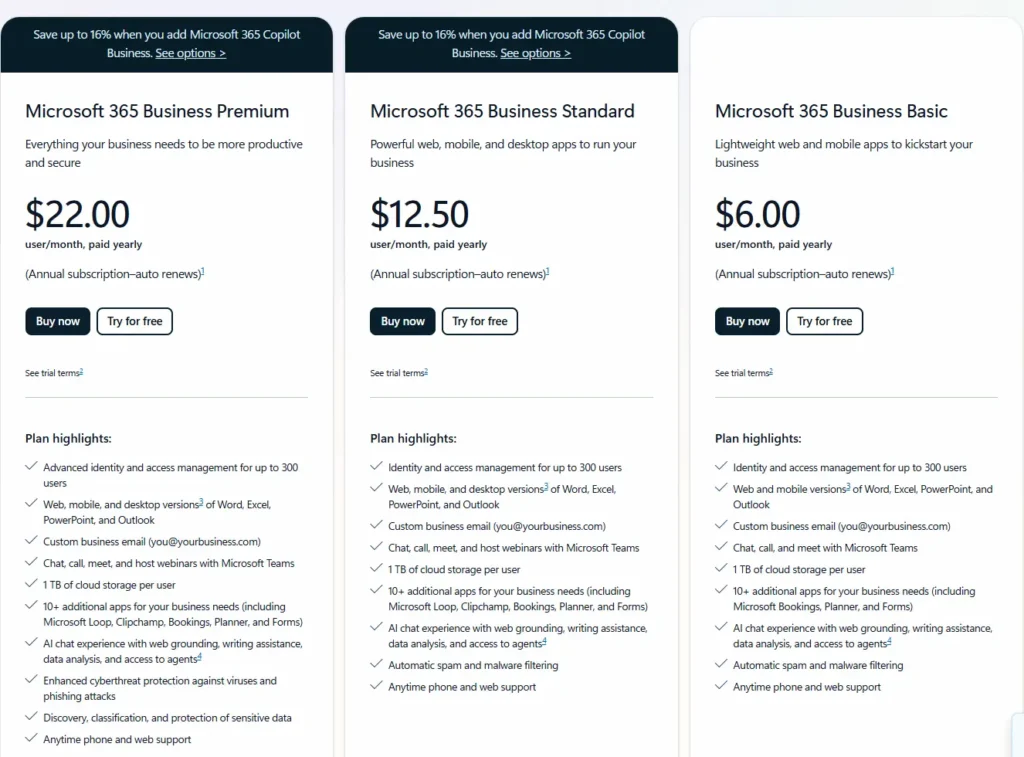
If you are a small Business owner and want to use the productivity suite, this plan is for you. It is recommended to have a Business domain for this plan.
In Business Basic, you get Web and Mobile versions of Word, Excel, etc. You get a custom Business email, Microsoft Teams and 1 TB of Cloud Storage per user. Alongside this, Microsoft also provides Bookings, Planner, and Forms as part of the suite.
Microsoft also promises Spam and Malware filtering with this plan for your Email. You can choose the With Teams or Without Teams plan.
A Product page for this product is available here.
Key differences between Microsoft 365 Basic and Office 365 Business subscription
Microsoft 365 Basic is an individual subscription designed for one user. It includes 100 GB of cloud storage for photos, files, and email attachments. The plan also provides ad-free, secure Outlook email, ransomware protection for OneDrive (with file recovery for up to 30 days after accidental deletion, corruption, or malicious attacks), and access to Microsoft support for Microsoft 365 and Windows 11.
Microsoft 365 Business Basic is intended for commercial use. It offers 1 TB of cloud storage per user, a professional business email address (name@yourbusiness.com), customer management tools, and Microsoft Teams features for calls, chats, and meetings with up to 300 participants.
Final Verdict
Compared to other premium plans, which cost a lot of money, if you are okay with web versions of Microsoft apps and are looking for OneDrive Storage and ad-free Outlook, Basic plans provide a strong real value.