Microsoft’s most successful Operating System, i.e., Windows 10, support ended on 14th October 2025, when it received its last update. This article describes your options if you have a Windows 10 PC that does not meet Windows 11’s strict hardware requirements. \
Table of Contents
Enroll for the Windows 11 Extended Security updates Program
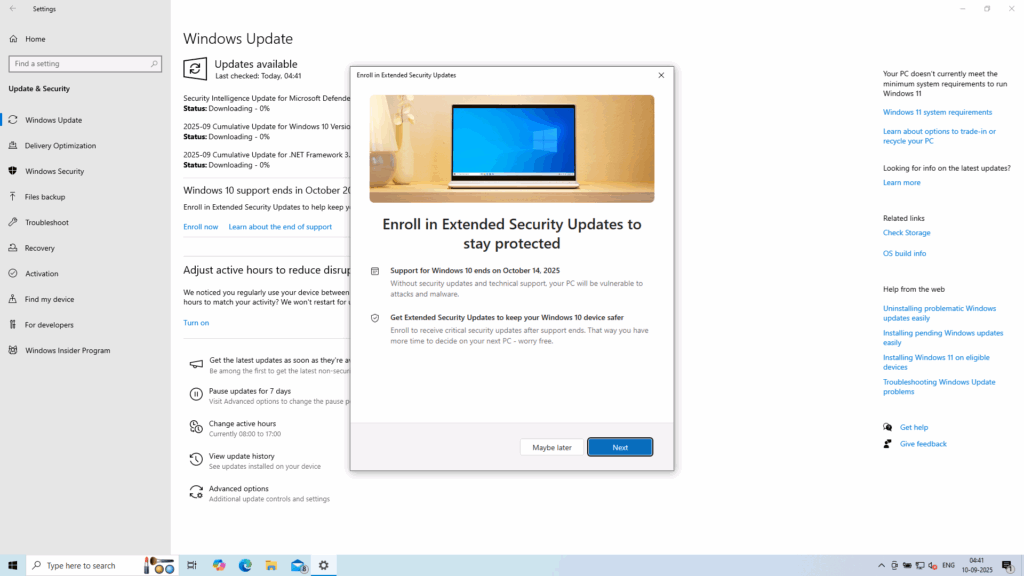
Microsoft is offering a generous deal that lets you get Windows 10 updates for free for another year. Known as the ESU program, once you sign up, you’ll receive updates for the Operating System until October 2026. The program requires that you be signed in with a Microsoft account. If you are running a Local account, you can redeem your 1000 MS rewards points for enrolling in the ESU. This is a free way to get updates, as the Windows 10 support ended. More details about the ESU program and how to configure it are here.
Bypass Windows 11 requirements after Windows 10 support ended
Several methods on the Internet allow you to bypass Windows 11’s strict requirements. The easiest one is creating a media using Rufus and selecting Bypass requirements. A detailed tutorial on how to use Rufus is available here.
Once the media is created, insert the USB drive into a USB port, open it in File Explorer, and run Setup.exe to start the upgrade. You won’t be told that the PC doesn’t meet Windows 11 requirements.
Invest in a new Computer
You can also invest in a new Computer, preferably a Copilot+ PC, which offers numerous advantages over a traditional computer. Several benefits include Mac-grade battery life and AI features that run locally. I covered Copilot+ PCs here in this article. These PCs should be the ideal choice after Windows 10 support ended, if you are planning to purchase.
More information about the Extended updates Program for Windows 10 is here.



